

Security Snippets #1
Your weekly Microsoft Security newsletter
🙋♂️Hey friends,
Christopher here with another edition of Microsoft Security Snippets! As always, I wont cover every single update, as there are simply too many. Instead, I focus on the key highlights for you.
Today’s content:
Microsoft Security Updates
Feature of the Week - Device Discovery in Defender for Endpoint
Learning & Community
Microsoft Security Updates
🚨 Sentinel
UEBA Behaviors Layer Aggregates Actionable Insights from Raw Logs in Near Real-Time (Preview)
This is a significant improvement to how security analysts deal with raw log data. Instead of manually sifting through thousands of AWS CloudTrail events or firewall logs, UEBA now transforms these into clear behavioral insights.
You will be able to see anomalies like “Inbound remote management session from external address” rather than somewhat cryptic log entries.
The problem this solves is straightforward. Anomalies generated by UEBA are often perceived as too noisy or hard to interpret. Analysts spend too much time correlating events manually (is this you?).
This new layer sits between your raw data and alerts, summarizing behavior patterns and mapping them to MITRE ATT&CK TTPs automatically.
This is exactly what modern SIEM should do. Rather than shipping all your logs to rather expensive log tiers, you get pre-aggregated behavioral insights based on the UEBA engine.
Im curious to see how the community perception of this feature will be in the preview but it looks promising to me.
🛡️ Defender XDR
CampaignInfo and FileMaliciousContentInfo Tables Now in Preview
Two new advanced hunting tables are available. CampaignInfo contains data about email campaigns identified by Defender for Office 365. FileMaliciousContentInfo has details about files processed in SharePoint Online, OneDrive, and Teams.
Tracking coordinated email campaigns and malicious file activity across collaboration platforms has been a bit fragmented in Defender XDR.
These tables are useful for threat hunters who want to correlate email campaigns with file-based threats. If you conduct threat hunting regularly or you build your own detections, you should consider those tables.
☁️ Defender for Cloud
Microsoft Security Private Link (Preview)
In Azure, private link has been around for several years at this point. Microsoft always recommends to leverage private link to enhance security for your workloads if possible.
Essentially, Azure private link and private endpoints can be used to send traffic between VNets via the Microsoft backbone.
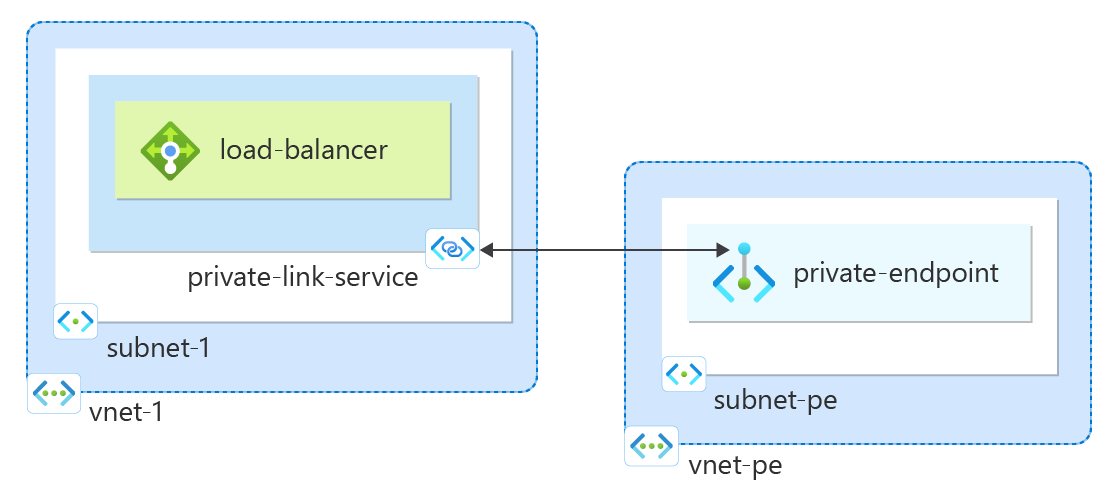
Many organizations have network-isolated environments where outbound internet access is restricted or not allowed.
Previously, getting Defender for Cloud telemetry out of these environments required complex firewall rules, Azure Monitor Private Link Scope configurations, or exemptions to security policies. This was messy and created compliance headaches.
With private endpoints, all security-related traffic from your workloads traverses the Microsoft backbone network without exposure to the public internet. This includes telemetry from Defender agents, sensors, add-ons, and extensions.
What you can do with it:
Protect workloads in isolated networks where outbound internet is blocked
Connect on-premises or hybrid environments securely via VPN or ExpressRoute with private peering
Replace the need for Azure Monitor Private Link Scope (AMPLS) and Azure Firewall egress rules for network-isolated workloads
Multiple Defender services can share a single Security Private Link resource, which simplifies your network architecture. DNS integration works through private DNS zones that resolve Defender endpoints to your private endpoint IP addresses.
Entra
Source of Authority Conversion for Synced AD Users (GA)
You can now convert synced on-premises AD users to cloud-only users without deleting and recreating them.
In the past, moving users from hybrid to cloud-only identity required deleting accounts, which breaks things like Teams chat history and OneDrive ownership.
This is a big deal for organizations moving away from on-premises AD. The migration path is now more clean.
If you are planning to decommission domain controllers, this removes a major obstacle even though getting fully rid of all domain controllers is still something most enterprises just dream about in 2026.
🔐 Purview
Microsoft Purview Posture Agent in Data Security Posture Management (Preview)
This is a new Security Copilot agent that uses natural language prompts to help you find sensitive information across your organization. You ask questions in plain English and it searches your data estate for sensitive content.
Finding where sensitive data lives in your organization is hard.
You have DLP policies, sensitivity labels, and classification rules, but understanding the actual exposure requires running reports, writing queries, and piecing together information from multiple sources.
In reality, many teams spend significant time just trying to answer questions like “where is our PII data?” or “what files contain credit card numbers in what sources?”
You deploy the agent in Purview, and it becomes available for natural language queries about your data security posture.
However, because it is an agent based on Security Copilot, it consumes Security Compute Units (SCUs) based on the complexity of analysis it performs so be aware of that.
🏗️ Feature of the Week
Device Discovery in Defender for Endpoint
This week I want to highlight device discovery in Defender for Endpoint. It is a feature that often gets enabled and then forgotten, but it solves a fundamental security problem: you cannot protect what you are not aware of.
The problem it solves
Most organizations have devices on their network that are not managed. These include IoT devices, contractor laptops, legacy systems, network equipment, and shadow IT.
Traditional asset inventory approaches rely on agents (not AI agents but agents to be installed on a client - not everything is AI even in 2026 😶).
But unmanaged devices by definition do not have your agents installed. This creates blind spots. Attackers love blind spots.
Furthermore, you maybe not only have an issue with shadow IT in your organization but also with rogue devices: actual malicious devices sitting in your network doing bad stuff.
How it works
Device discovery uses your existing onboarded Defender for Endpoint devices as sensors. These devices passively observe network traffic or actively probe the network to find other devices. No additional hardware or agents required.
There are two modes:
Basic discovery uses passive techniques only. Your onboarded devices listen to network traffic and identify other devices based on what they see. This has minimal network impact but finds fewer devices.
Standard discovery adds active probing. Your onboarded devices send out queries to discover devices that are not actively communicating. This finds more devices but generates some network traffic because it puts packets into the network.
What you get
Discovered devices appear in your device inventory with details like device type, operating system, network information, and risk level. You see which devices are unmanaged and can prioritize onboarding them. You also get visibility into IoT and OT devices that cannot run the Defender agent.
The device inventory shows you:
Device name and type
IP and MAC addresses
Operating system when detectable
First and last seen timestamps
Onboarding status
Risk and exposure levels
Set up device discovery
To set up device discovery, simply take the following configuration steps in the Unified SOC Portal:
Navigate to Settings > Device discovery
If you want to configure Basic as the discovery mode to use on your onboarded devices, select Basic and then select Save.
If you’ve selected to use Standard discovery, select which devices to use for active probing: all devices or on a subset by specifying their device tags, and then select Save.
Learning & Community
📚 Learning Resources
📈 Free Microsoft Assessments
🎉 Free Upcoming Microsoft Events
And that’s it for this week. I hope you enjoyed it and look forward to the next one already.
Cheers,
Christopher